Speed chart
The speed chart defines the sections of a Regularity stage and the target average speed of each. It is the roadbook of the stage in numbers: the app turns it into an ideal time for every point of the route.
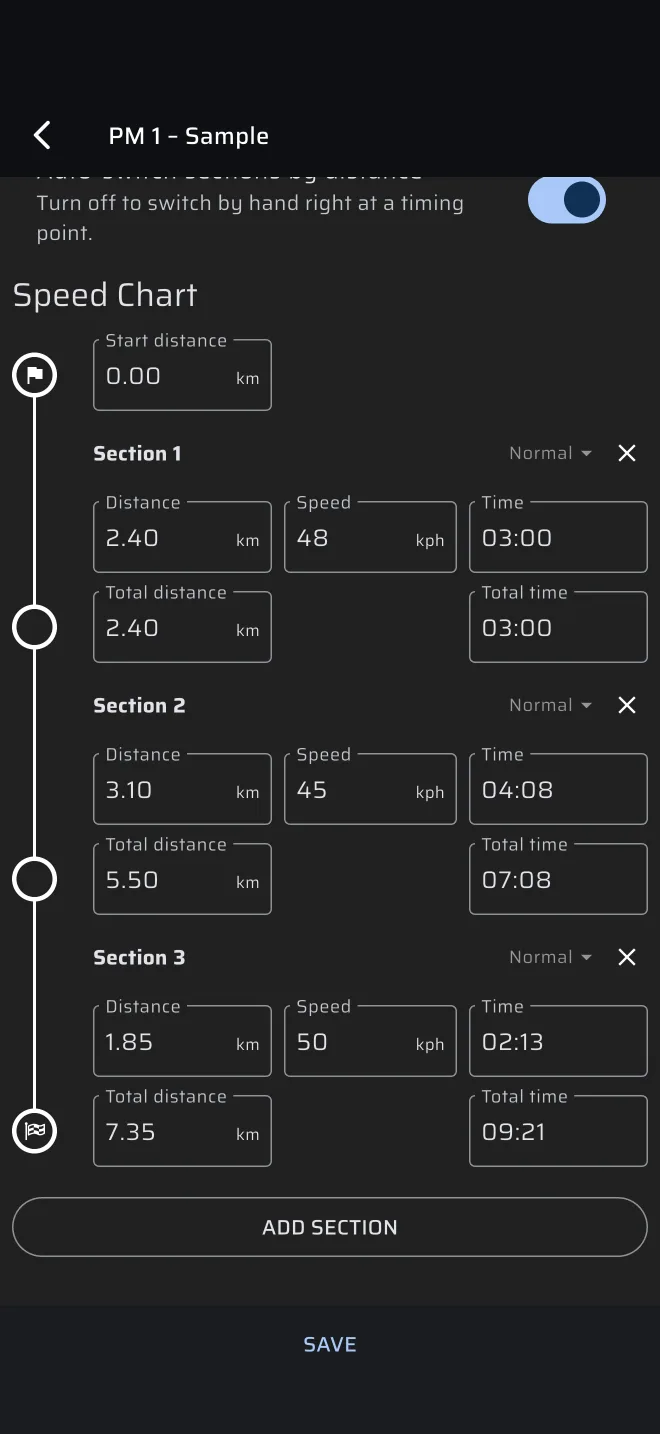
Start distance
The first row, with a flag, is the Start distance. It is the distance on your roadbook odometer at the start of the stage, and it defaults to 0.00. The stage trip starts counting from this value, so enter a value other than 0 only when the roadbook's distances do not start from zero at the stage start.
Section rows
Tap ADD SECTION to add a row. Each section has:
- a header, Section 1, Section 2 and so on, with a type chip (see below) and a cross that removes the section;
- three fields: Distance, Speed and Time;
- under the row, the running totals at the end of the section: Total distance and Total time.
The last row has a chequered flag: it is the finish.
Distance and speed are in the Distance and Speed units you chose in Settings > Units. Time is entered with a time picker.
Any two give the third
Fill in any two of Distance, Speed and Time and the app works out the third.
- Change Distance and the Time is worked out from the Speed. If there is no speed yet but there is a time, the Speed is worked out from the time.
- Change Speed and the Time is worked out from the Distance. With no distance, the Distance is worked out from the time.
- Change Time and the Speed is worked out from the Distance. With no distance, the Distance is worked out from the speed.
Distance and speed must be larger than zero, or the field says Invalid input.
Total distance and Total time
The totals are measured from the start of the stage, like the roadbook's own columns. Type the roadbook's odometer value into Total distance, and the app works out the length of the section from the end of the section before. Pick a Total time and the section time is the difference to the section before. A total time that is not larger than the previous one is ignored.
Use them to copy the table of the roadbook straight in: odometer for the distance, and the table of times for the time.
Section types
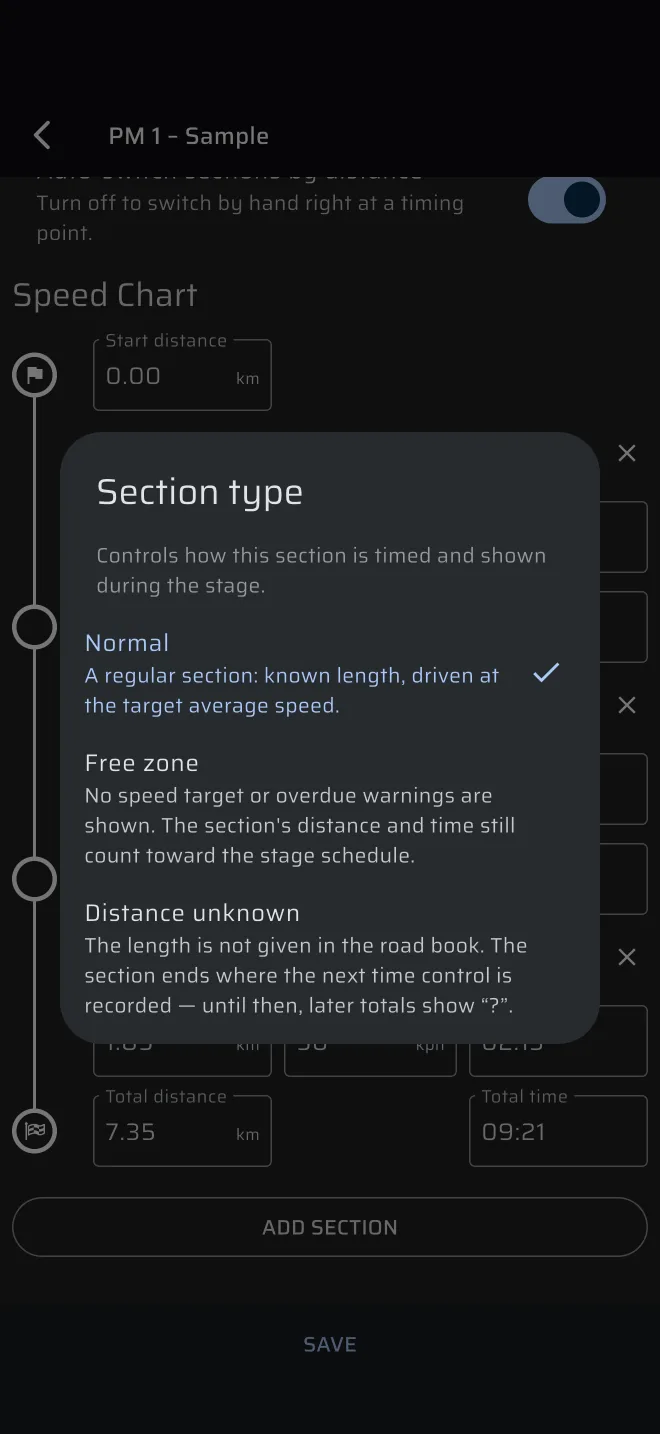
Tap the type chip of a section to choose its type. Section type says: Controls how this section is timed and shown during the stage.
| Type | Meaning |
|---|---|
| Normal | A regular section: known length, driven at the target average speed. |
| Free zone | No speed target or overdue warnings are shown. The section's distance and time still count toward the stage schedule. The target reads Free zone. |
| Distance unknown | The length is not given in the road book. The section ends where the next time control is recorded. Until then later totals show ?. |
A Distance unknown section needs a Speed only. Its distance and time are ?, and so is every total after it. The section ends when you record a TC past its start: press Next Section + Restart or Sync + Restart, or long press Ideal Time. Until then the timeline shows ? for the distance left and the bar runs as an indeterminate sweep.
How the chart drives the ideal time
The ideal arrival time at a distance is a start time plus the sum of the times of the sections up to there:
- Each section takes
distance ÷ speed. - The start time is the moment the stage started (or the start time you set).
- Distances are on the stage trip, so a stage trip that has drifted gives a wrong ideal time. Correct the trip at landmarks, see Regularity | TSD mode.
Example. Two sections: 4.00 km at 40 km/h takes 6 min, then 3.00 km at 30 km/h takes 6 min. A stage started at 10:00:00 has the ideal arrival time 10:06:00 at 4.00 km and 10:12:00 at 7.00 km. Between the points the ideal time moves smoothly.
Ideal Time is the actual time minus that ideal arrival time.
A recorded TC re-bases the clock: from the TC on, the ideal arrival time is the TC time plus its Restart time, at the distance of the TC, and then the sections go on as before. Without TCs, the ideal time is cumulative from the start. See Checkpoints and TCs.
A stage with no sections has no ideal time. The app asks Start without sections? before it starts.
Limits
- The chart is for Regularity stages. Race and Recce stages do not use it.
- A section has one constant speed.
- Several sections can share the same speed. Add a new row at every change of average speed in the roadbook.