Rally raid and off-road
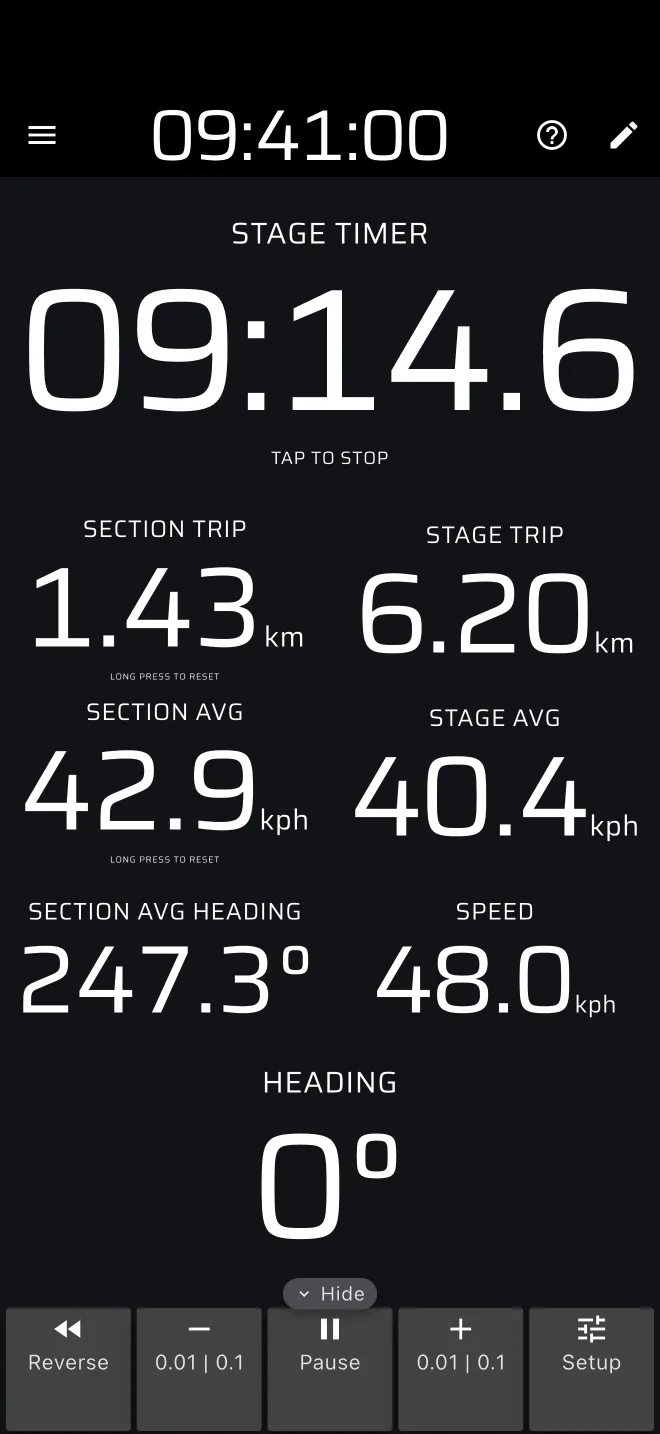
Rally raid and baja stages are long, and navigation matters as much as speed: you follow a roadbook of distances and headings. Rally Tripmeter measures the distance and the heading for you. It does not know the roadbook, so the co-driver still reads it and compares.
What you need
- Pro, or the daily Pro fuel, for Rally Raid mode and Liaison. Without a Pro plan you can drive them each day on the free Pro fuel (40 km by default). For plain roadbook work, the Tripmeter mode with Trip 1 and Trip 2 is enough. It sits at the top of the drawer's Modes, and needs a Basic plan or the free daily distance. See Licences and plans. To try the Pro modes without driving, use Demo mode. See Try it without driving.
- A rigid phone mount the co-driver can read and reach. Tracks shake a phone hard.
- A charger. GPS with the screen on drains the battery quickly.
- Bluetooth buttons (optional) from shop.apphero.ee, if the screen is hard to hit. See Remotes.
- The Rally Time set to the official clock, if you use Liaison or time the stage (tap the clock in the app bar).
Allow 10 to 15 minutes to set the app up before the event.
GPS distance is not the organiser's distance
Canyons, dense forest and tight switchbacks make GPS distance drift from the roadbook. Trust the landmark, correct the trip (see Roadbook navigation) and carry on.
What the app does and does not do
| The app does | The app does not |
|---|---|
| Count distance with Trip 1 and Trip 2, with plus and minus corrections | Show the roadbook, a tulip diagram or the organiser's waypoints as a list |
| Show your GPS heading, and the direction you have travelled since a reset | Steer you to a waypoint, or show a bearing or distance to it |
| Time a stage and show section and stage trips with their averages | Warn you that you missed a waypoint |
| Show your position and your own tracks on a map | Read the roadbook aloud |
If you import the organiser's track you can see it on the Map mode next to your position. That is a picture of the route, not guidance. See Tracks and GPX.
Reading a rally raid roadbook
A rally raid roadbook typically gives, for each waypoint:
- the total distance from the start of the stage;
- a tulip diagram of the junction;
- the heading (CAP) to follow, and the partial distance to the next waypoint.
The co-driver confirms the position from two numbers: how far you have come and which way you are pointing. The app gives you both.
- The distance since the last waypoint is a trip you reset at that waypoint: Trip 1 in Tripmeter, or the Section Trip in Rally Raid.
- The distance since the start is Trip 2 in Tripmeter, or the Stage Trip in Rally Raid.
- The heading is the Heading component, which is the direction the phone is moving over the ground.
Tasks
- Roadbook navigation: Trip 1 and Trip 2, resets, corrections and Reverse.
- Rally Raid mode: the Stage Timer, section and stage trips, Heading and average heading.
- Remotes: Bluetooth buttons and Android volume keys.
- Tracks and GPX: recording, points of interest, importing the organiser's route, the Map.