Telemetry
Telemetry is the detail screen of one history run: the track on a map and the speed along the stage. Tap a card in History to open it.
The screen
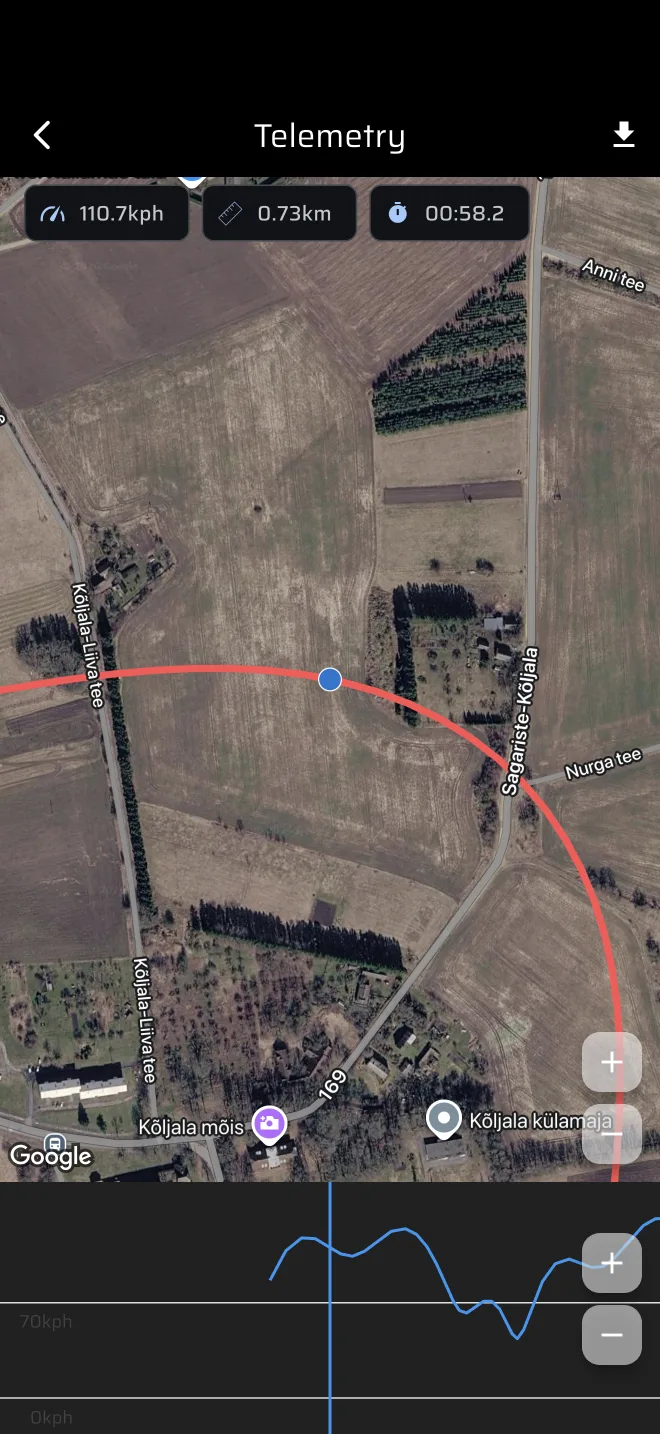
- Map. It shows the track in red, centred on the point you are looking at. The map follows the graph. You cannot pan it. The zoom buttons change the zoom between a close and a wider view.
- Chips. Three chips at the top left show the speed, the distance and the stage time at the selected point.
- Speed graph. The graph below the map plots speed against distance. Put a finger on it and drag. The map and the chips follow.
The speed on the graph is the GPS speed. It is not corrected by the calibration factor. Speed uses the Speed unit, kph or mph.
Export the track
Tap the download icon in the top bar. The share sheet opens with a GPX file. The file holds the track points with latitude, longitude, altitude and time. It does not hold speed. The file is named after the stage, with spaces replaced by underscores, or rt_stage when the run has no name.
When it stays empty
A run needs at least two GPS points. If the track or the run could not be loaded, the screen shows an empty message. Fix the connection and open the run again.
Comparing runs
The app has no side-by-side comparison. Open two runs one after the other and drag to the same distance in each.