Checkpoints and TCs
A checkpoint is a time control (TC) that you record during a Regularity stage. Each one has a time, a distance and a restart time. A recorded TC restarts the ideal time from that moment. This page describes how to record one, the Checkpoints sheet where you review and edit them, and how the offsets add up.
What a checkpoint holds
| Field | Meaning |
|---|---|
| TC time | The clock time on the Rally Time. A TC that you record by a press keeps the exact moment of the press, and the sheet shows it with hundredths of a second. A time that you type in is in whole seconds, as on a time card. |
| Distance | The stage trip at the TC. |
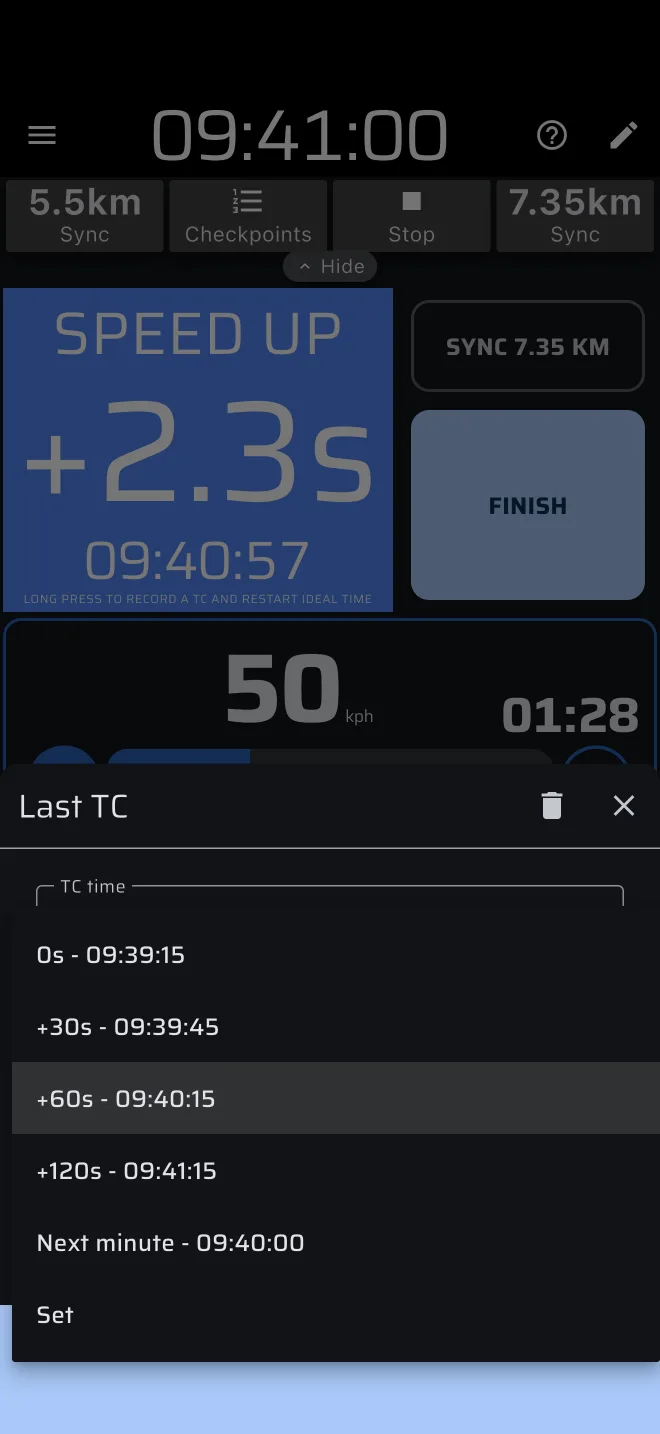
| Restart time | When the ideal time restarts after the TC. By default the TC time itself. Any time between the TC and the restart is dead time: it does not count. |
| New speed target | Optional. A different target speed for the rest of the section. |
Recording a TC
Any of these records a TC at the current stage trip, and asks nothing:
- long press Ideal Time. It also opens the Checkpoints sheet;
- Next Section + Restart (the TC is at the section end);
- Sync + Restart (at the snapped distance);
- TC (as a button component of a custom layout);
- the Quick TC action of a Bluetooth button, or of the tap and long press settings;
- the add icon (Record TC) in the Checkpoints sheet.
A TC that falls within 0.5 m of one that exists is ignored, so a double press does not make two.
A TC re-bases the ideal time: from the TC on, the ideal arrival time counts from the TC time plus the Restart time, at the distance of the TC. Because a pressed TC keeps its exact moment, the ideal time restarts at exactly 0.0. If you do not want to re-base, do not record a TC in the test. See Speed chart and the Regularity guide.
The + Restart in a button's name says that it records a TC. The TC button has the hint Restarts ideal time, unless Hide hints is on. Under Ideal Time the hint reads Long press to record a TC and restart ideal time.
When the stage trip is past the finish, or the stage has no sections, a long press on Ideal Time finishes the stage instead of recording a TC.
The Checkpoints sheet
Open it with the Checkpoints button of the stage toolbar. That button shows once at least one TC is recorded, while the stage runs and after it has finished. It also opens when you long press Ideal Time.
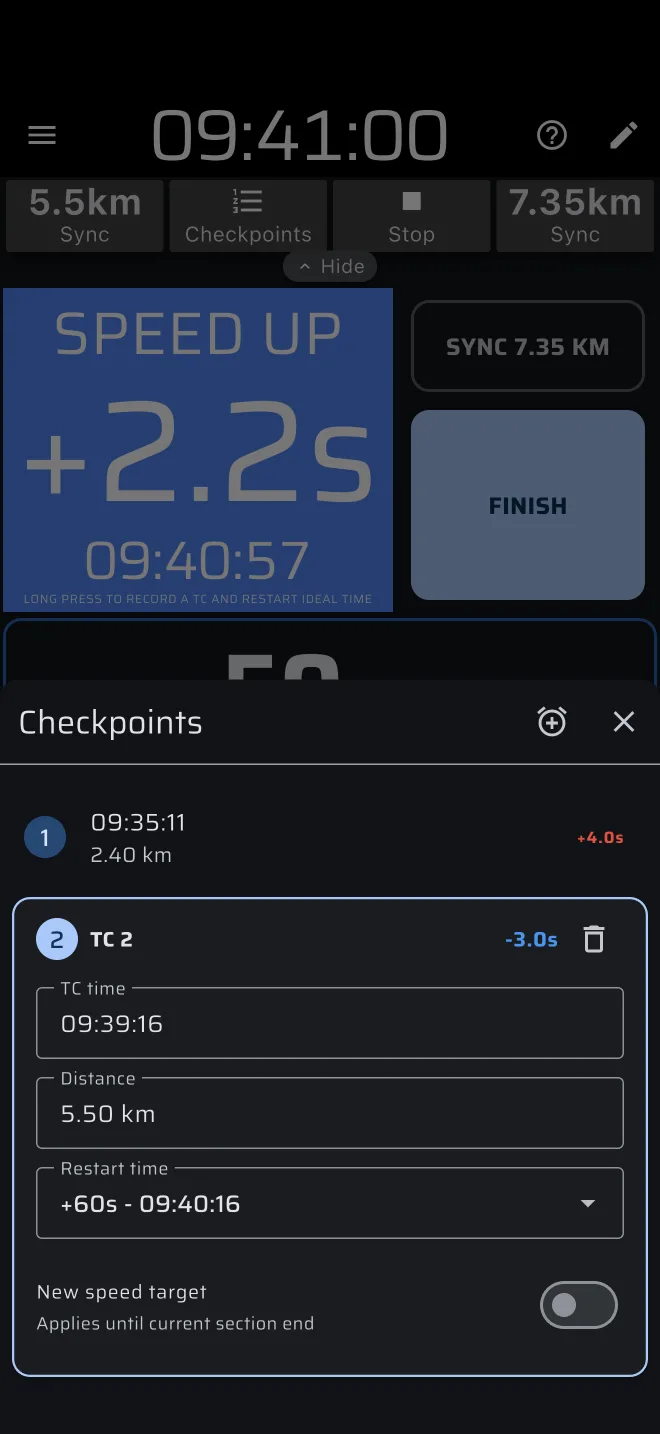
The sheet is titled Checkpoints and lists the TCs. With none it says No TC recorded and offers Record TC.
- Inactive rows show the number, the TC time, the distance and the offset.
- The active row is open as a card, headed TC 1, TC 2 and so on, with the offset, a bin and the fields TC time, Distance, Restart time and New speed target. Tap another row to open it.
- Every change applies at once, and the ideal time follows.
Restart time
The Restart time menu offers:
| Option | Restart |
|---|---|
0s |
At the TC time. |
+30s, +60s, +120s |
That long after the TC time. |
| Next minute | At the next full minute. |
| Set | A clock time you pick. |
Each entry also shows the resulting clock time. Use it for a format where the restart is a minute after the control, or an out time that the organiser gives you.
New speed target
The switch New speed target (Applies until current section end) lets you drive the rest of the section at another speed, for instance when the organiser changes it after a delay. Enter the new speed in the field that appears.
If the TC is exactly at a section boundary, which is where Next Section + Restart puts it, the next section gets the new speed. The switch keeps its state when you reopen the sheet.
Fixing a wrong TC
Open the sheet, tap the TC and change its TC time or Distance, or delete it with the bin. The offsets are recalculated at once.
Offsets and totals
The offset of a TC is the TC time minus the ideal arrival time at its distance. It is worked out from the previous TC (its time plus restart time) or from the stage start.
- A positive offset means you were late. A negative one means you were early.
- In the Checkpoints sheet the offset is red when late and blue when early. This is the opposite of the Ideal Time header, where SPEED UP is blue by default. Read the sign.
When the stage finishes, the finish line counts as a last TC: it has an offset too, but it is not stored as a TC. The total is shown in Ideal Time:
- It is the sum of the absolute offsets of all recorded TCs plus the finish. An early 5 s and a late 5 s add up to 10 s, not to zero.
- The sign in front reads
+or-when only one of the offsets was not zero, and±when there were more.
Limits
- Checkpoints exist for Regularity stages. Race and Recce stages record none.
- The time card of Liaison mode is a separate thing, see Liaison.