Average speed
Average speed is the Tripmeter screen with the average speed of Trip 2 added. It is a Pro mode.
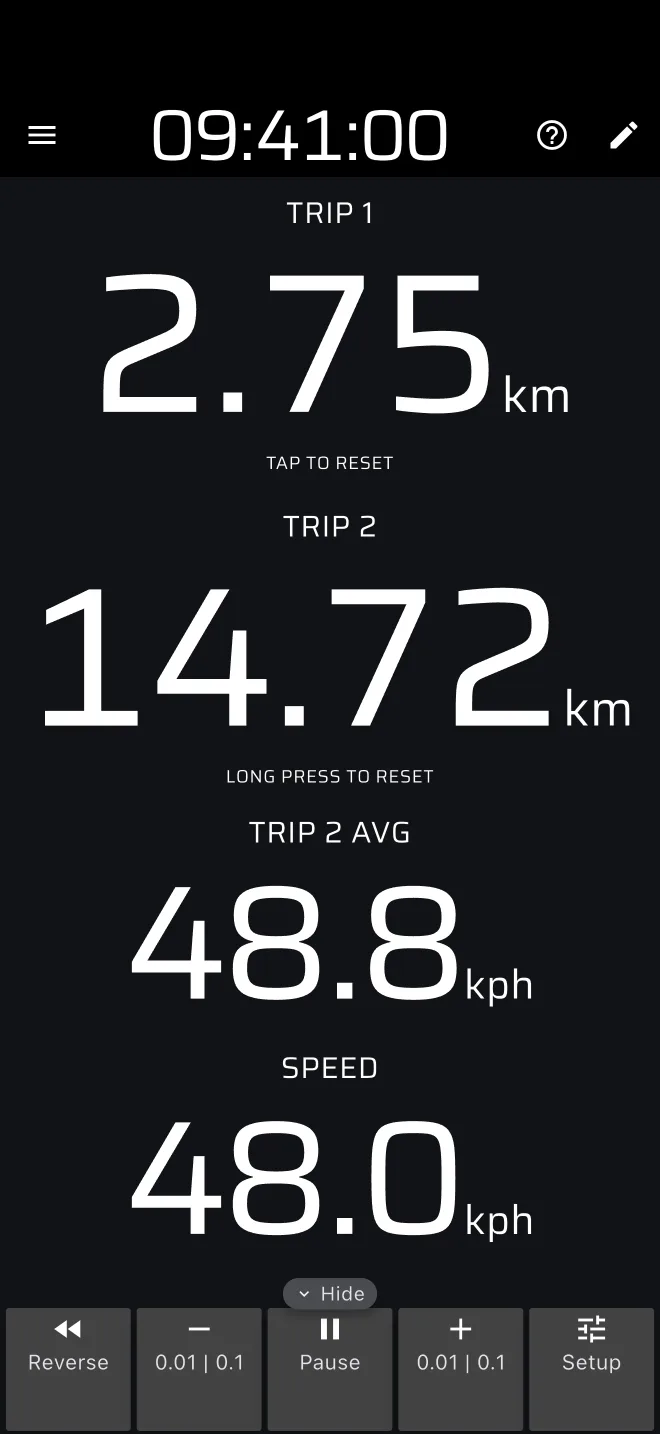
The screen
| Component | Shows |
|---|---|
| Trip 1 | Distance since you last reset Trip 1. |
| Trip 2 | Distance since you last reset Trip 2. |
| Trip 2 AVG | Average speed of Trip 2. |
| Speed | Your GPS speed. |
At the bottom (right, in landscape) is the Trip toolbar.
The ? in the app bar offers Quick guide (tips on the live screen, while Demo mode drives the car) and User Manual.
How the average is worked out
Trip 2 AVG is the distance of Trip 2 divided by the time since Trip 2 was reset. It includes the time you stood still. A stop at a junction or a fuel stop lowers it.
- It restarts when Trip 2 restarts. There is no separate reset for the average. Reset Trip 2 with a long press on the screen (by default) or with the tap or button action Reset Trip 2.
- Pause stops the distance and also the time of the trip, so a pause does not lower the average.
- Reverse counts the distance down while the time keeps running.
- Before the first fix, or right after a reset, it shows 0.
- The plus and minus buttons change the distance and with it the average. The Set dialog of a trip can also set the average directly, see Trip toolbar.
- It shows one decimal, or two with Show speed to two decimals. The calibration factor applies.
Using it
- On a liaison, reset Trip 2 at the last time control. Trip 2 AVG then tells you the average since that control, and you can compare it with the average the time card asks for. Liaison mode has the same four readouts plus the time controls.
- The speeds use the Speed unit in Settings > Units.
Other averages and the highest speed of a trip are not on this screen. In a Custom layout you can add Trip 1 AVG, Trip 1 Max Speed and Trip 2 Max Speed. Race mode has the stage and section averages.
Plans
Average speed is a Pro mode. Without Pro you can drive it on the daily Pro fuel: a gauge under the app bar shows what is left today. When it is used up, the mode is covered by You are out of fuel until the next day, with Go Pro and Enable Demo mode. Demo mode uses no fuel. See Licences and plans.