Live map
The live map shows everyone who is sharing their location. You see it in two places: in Map mode on the phone and at racelivemap.com in a browser.
In a browser
Open racelivemap.com. The page signs in by itself, shows the map and the participants. Nobody needs an account or the app.
Tap the racelivemap.com link in the Share live location sheet (the Live chip in the drawer) to open it from the app.
In Map mode
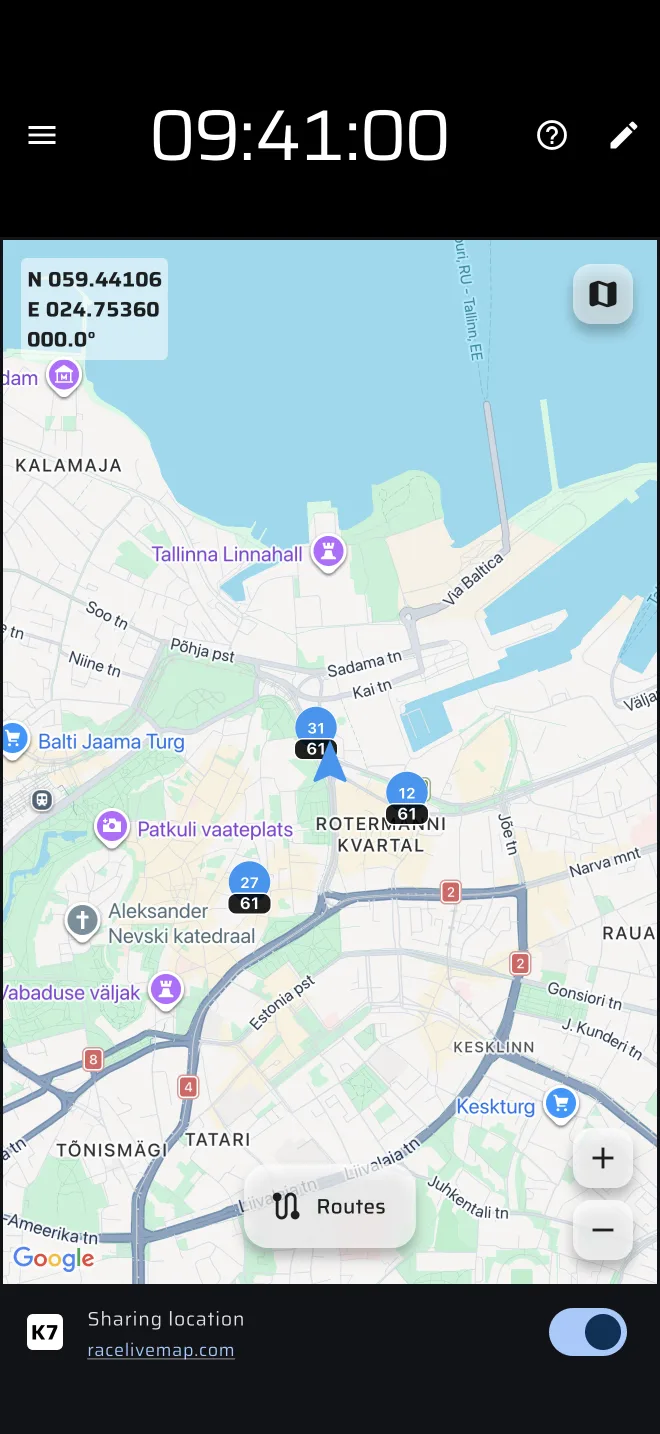
Open Map from the drawer, for example in Road, touring and classic. The map follows you. Other participants show only while sharing is on.
Who is shown
The map shows participants whose last position is less than 2 minutes old. After that they disappear. Your own position is the blue arrow, not a participant marker.
Each participant is a round marker with the identifier in it, and the speed in km/h under it. The colour tells the state:
| Colour | Meaning |
|---|---|
| Blue | Moving, at about 3.6 km/h or faster |
| Orange | Slow or stopped |
| Grey | Disconnected, or no update for 30 seconds |
A phone that loses its connection is marked disconnected by the server, so it turns grey even if it never sends again. The speed is always in km/h, whatever your unit setting.
Tap a marker to follow it. The map then stays on that participant. Tap again, or move the map yourself, to stop following.
Map controls
- The map type button switches the base map. The default is hybrid.
- The zoom buttons and the centre button are at the bottom right. The centre button returns the map to your position.
- Routes opens Saved Routes. Routes you add with Add to map are drawn on the map.