Map
Map mode is a full-screen map that follows your position. It is in the Rally raid and off-road and Road, touring and classic groups of the drawer.
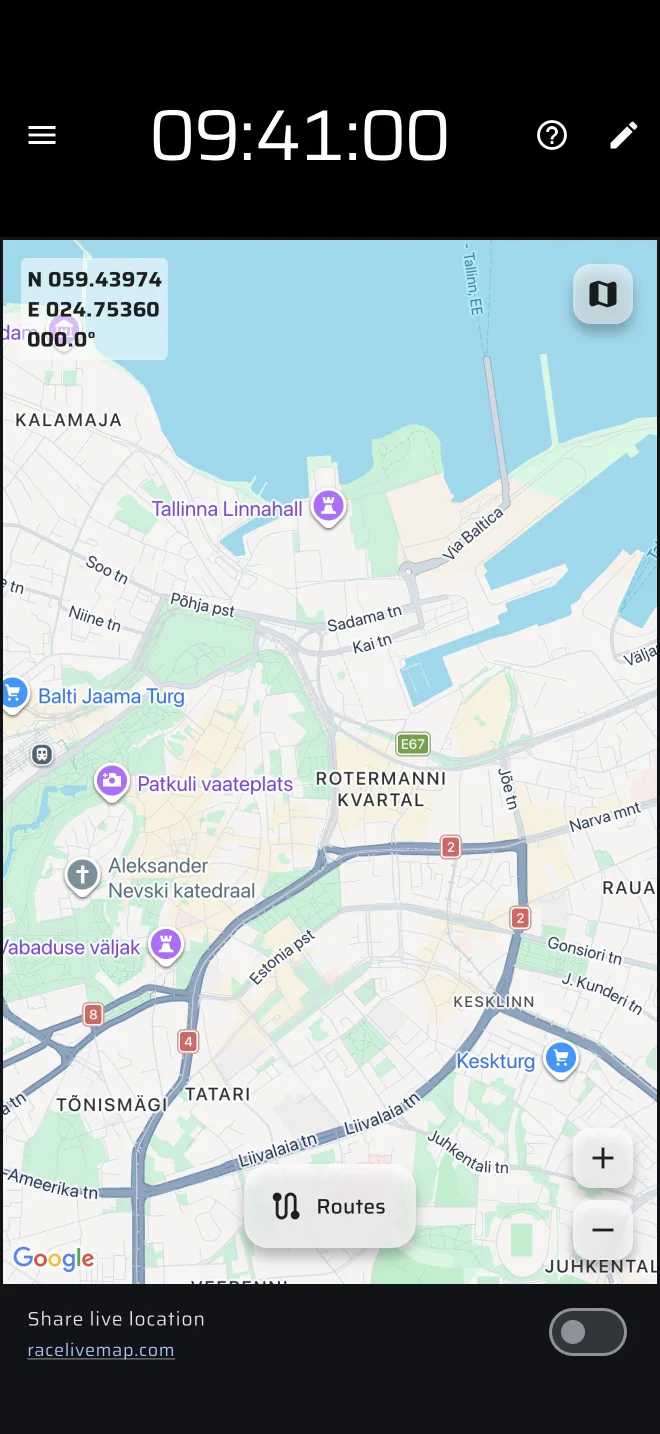
The screen
The map shows your position at the centre. The base map is Google Maps and the tiles load from the internet.
- Your position. A blue arrow while you move faster than about 5 km/h, and the map turns so that the arrow points the way you go. A position dot when you are slower or standing.
- Map type button (top right). Opens Map Type with Normal, Hybrid, Terrain and Satellite. The default is Hybrid. The choice is kept.
- Position overlay (top left). Latitude, longitude and bearing of the centre of the map. Tap it to type in coordinates and a bearing, and the map jumps there.
- Zoom buttons (bottom right), plus and minus. Pinch and drag work too.
- Centre button (bottom right, above the zoom buttons). It appears when you have moved the map away, and takes you back to your position.
- Routes (bottom centre). Opens Saved Routes. Routes that you switch on with Add to map are drawn on the map, and the button then reads Routes (2), with the number you have on.
- Share live location row (bottom, portrait only). A switch that does the same as the Live chip in the drawer, with the identifier badge. In landscape a small button does the same.
When you drag the map, it stops following you and a crosshair shows the centre. Tap the centre button to follow again.
The ? in the app bar offers Quick guide (tips on the map controls, while Demo mode drives the car) and User Manual.
Other people
While sharing is on, the other participants show on the map. See Live map. The recording of a route you are driving now is not drawn here. Record and then open the route, see Recording a route.
Taps
Taps and long presses do nothing in Map mode. They never reset a trip. There is no trip toolbar.
Plans
Map works like Tripmeter: free for 80 km a day, unlimited with Basic or Pro. See Licences and plans.
A map component can also be placed on a custom layout next to the trips.
Limits
- Without a data connection, tiles that are not already loaded stay empty.
- The map is for orientation. It does not give directions.